
Serendipity Blackmagic, Megarip and Veripress were affected by a Sentinel dongle driver error that caused an operating system crash when attempting to run the Server on Mac OS X 10.9 and above.
A new Mac OS X 10.9+ compatible dongle driver has been released and ships with all Serendipity products of version 5.4.02 and above.
Mavericks users with previous versions of the Sentinel dongle driver should follow these steps to install the new driver:-
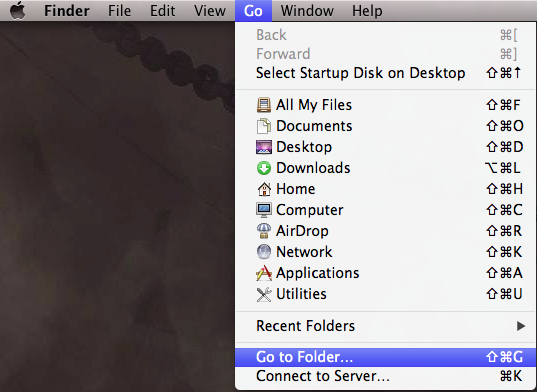
1. Select the Go to Folder… option from the desktop Finder > Go menu
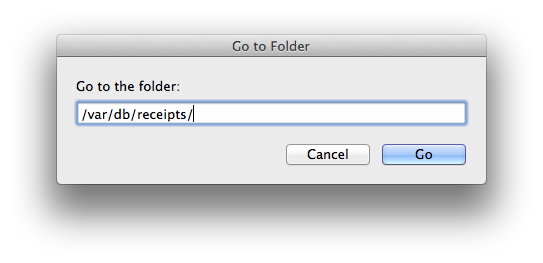
2. Type /var/db/receipts/ into the pop Go to Folder window
3. When the /receipts/ finder window appears, scroll down to and delete the Safenet Sentinel installation receipt files
com.apple.Safenet.SentinelSystemDriver.bom
com.apple.Safenet.SentinelSystemDriver.plist
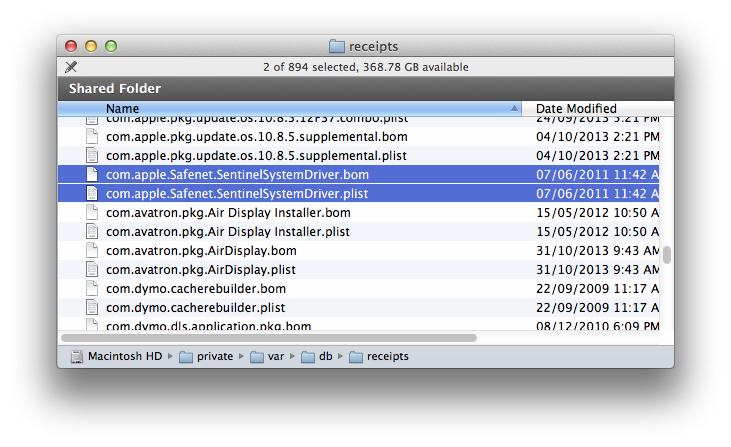
then close the Finder window.
4. Insert the Serendipity Blackmagic/Megarip/Veripress 5.4.02 installation DVD, navigate to the /dongle/macosx/ folder and run the SentinelSystemDriver.pkg installer package. Follow the instructions to install the driver and Restart the machine.
…alternatively the dongle driver can be downloaded from here: Download
NOTE – the Mac OS X 10.9+ dongle driver is compatible with previous versions of Serendipity Software products.