
Serendipity Blackmagic (with SoftProofing Add-on) / Veripress 6.0+ users now have the option to display and merge spot colours in Softproof in an RGB colour space.
Merging spot colours in RGB can result in significantly better on-screen colour matches.
 |  |
| CMYK Mode | RGB Mode |
Enabling RGB spot colour merging
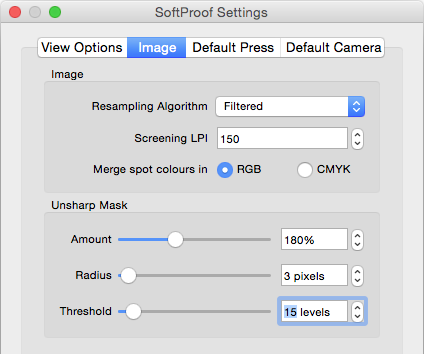
To switch to RGB spot colour merging:
- open the Softproof application
- choose File Menu > Softproof Settings
- select the Image tab
- in the Image panel, switch the Merge spot colours in setting from CMYK (the existing default) to RGB.
Printed RGB Spot Colours in Blackmagic 6.0+
Printed spot colours are automatically rendered directly in RGB for Medias that use an RGB colourspace. Merging spot colours in RGB can result in significantly better colour matches for those printers.