For the older versions:
- Open the Workbench application.
- Select Pagesetup in the Workbench datatypes list.
- Choose an existing Pagesetup to edit or create a new one.
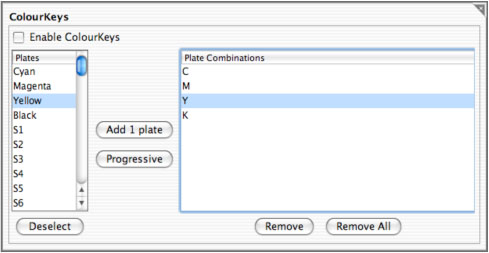
- Go to the ColourKeys panel.
- Enable ColourKeys.
- Select the plate or plates from the available list.
- Click Add to create an entry in the Plate Combinations list.
- Repeat with the plates as desired.
- Deselect a single plate by clicking the plate again.
- Choose the Deselect button to deselect all plates currently selected.
- Save when finished.
For the newer versions:
- Open the Workbench application.
- Select Jobticket in the Workbench datatypes list.
- Choose an existing Jobticket to edit or create a new one.
- Go to the ColourKeys panel.
- Enable ColourKeys.
- Select the plate or plates from the available list.
- Click Add to create an entry in the Plate Combinations list.
- Repeat with the plates as desired.
- Deselect a single plate by clicking the plate again.
- Choose the Deselect button to deselect all plates currently selected.
- Save when finished.